
Download Anxiety Test APK – Anxiety Self-Assessment, Zung Scale, Mental Health Tool
Overview
Designed for individuals seeking a preliminary understanding of their mental well-being, Anxiety Test is a free Android application developed by dNT in the Lifestyle category, specifically within Health & Fitness. The app implements the Zung Anxiety Self-Assessment Scale, a widely recognized psychological tool used to measure the severity of anxiety symptoms. It consists of 20 questions, each offering four response options that users must select based on their current emotional state. The primary purpose of the application is to assist users in evaluating their anxiety levels through self-reporting, enabling them to recognize potential signs of anxiety and consider further professional evaluation. It is intended for personal use and not as a substitute for clinical diagnosis.
Target users include individuals concerned about their mental health, those experiencing stress or emotional discomfort, and anyone interested in monitoring their psychological well-being over time. The app supports real-world usage scenarios such as daily self-check-ins, pre-appointment preparation for therapy, or as a supplement to mental health education. While the developer did not provide additional background on dNT, the app’s focus on evidence-based assessment tools suggests a commitment to reliable self-evaluation methods. It is important to emphasize that results should not guide major life decisions or medical actions without consulting a qualified healthcare provider.
Key Features & Capabilities
- Zung Anxiety Self-Assessment Scale Integration – The app implements the full 20-item Zung scale, a standardized tool used in clinical and research settings to assess anxiety severity.
- Self-Report Questionnaire Format – Each of the 20 questions presents four response options, allowing users to rate their symptoms on a consistent scale.
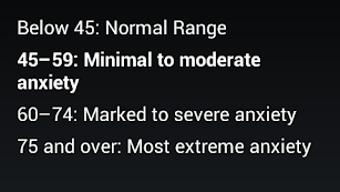
- Immediate Results and Scoring – After completing the test, users receive a total score that reflects their anxiety level, helping them interpret their results in context.
- Non-Diagnostic Tool – The app clearly states that results are for informational and self-reflection purposes only, not for medical diagnosis.
- Free Access and Offline Use – Available at no cost, the app does not require an internet connection to complete the assessment, enhancing accessibility and privacy.
These features enable users to conduct consistent, structured self-assessments. For example, someone managing stress at work might use the app weekly to track changes in anxiety levels. A person preparing for a therapy session could complete the test beforehand to identify patterns in their symptoms.
The scoring system supports longitudinal tracking, allowing users to observe trends over time. The app’s design prioritizes clarity and usability, ensuring that individuals with no clinical background can understand and interpret the results without confusion. It does not include advanced analytics or data export, but its simplicity enhances reliability for its intended purpose.
User Interface, Workflow & Performance
The user interface of Anxiety Test is designed with simplicity and accessibility in mind. Navigation is straightforward, guiding users through the 20 questions in a linear format with clear instructions at each step. The layout is minimal, focusing on readability and ease of interaction, which reduces cognitive load during emotionally sensitive assessments. Users are presented with one question at a time, followed by four selectable response options, ensuring a consistent and structured experience.
Workflow efficiency is high, as the app does not require registration, account creation, or data sharing. The entire process—from opening the app to receiving results—can be completed in under five minutes. The developer did not specify resource usage details, but based on general behavior of lightweight Android applications, it is expected to operate with minimal impact on battery and memory. Performance observations are based on general software behavior patterns. Stability appears reliable for its intended function, as the app does not include complex backend processes or real-time data synchronization.
Compatibility & System Requirements
Anxiety Test is designed for Android devices and is available for free download on the Android platform. The app’s compatibility information is limited to the Android operating system, with no specific version requirements provided. The installation size was not specified, so exact storage needs remain unknown. The developer did not list hardware requirements such as RAM, CPU, or screen resolution.
Platform compatibility information is limited. While the app is available on Android, details about minimum OS versions or device types (e.g., smartphones, tablets) were not provided. Users should ensure their device runs a compatible Android version, though specific thresholds are not stated. The developer did not specify whether the app supports older Android versions or requires a recent OS update. For optimal performance, users are advised to use a device with standard Android functionality and sufficient screen space to view questions clearly.
Pros and Cons
Pros
- Free to download and use with no in-app purchases or ads
- Based on the scientifically recognized Zung Anxiety Self-Assessment Scale
- Simple, intuitive interface suitable for non-experts
- Can be used offline, preserving user privacy
- Quick and efficient completion time (under 5 minutes)
Cons
- Results are not a medical diagnosis and should not replace professional evaluation
- Limited to a single assessment tool with no additional mental health resources
- No data export or long-term tracking features
- Exact system requirements and file size were not provided
- Not available on iOS or other platforms
FAQ Section
Is Anxiety Test available for iOS devices?
Currently, the app is only available for Android devices. There is no official version for iOS or other platforms.
Can this app diagnose anxiety?
No. Anxiety Test is not a diagnostic tool. It uses the Zung Anxiety Self-Assessment Scale to provide a self-evaluation of anxiety symptoms. A formal diagnosis should only be made by a qualified healthcare professional.
Do I need an internet connection to use the app?
No. The app can be used offline, allowing users to complete the assessment without requiring an internet connection.
How often can I take the test?
There is no restriction on how frequently you can use the app. Users may take the test as often as they wish for personal reflection or monitoring purposes.
Is my data safe when using this app?
Since the app does not require login or account creation and can be used offline, it does not collect or transmit personal data. However, users should still exercise caution when sharing sensitive information.
Final Thoughts + CTA
Anxiety Test offers a straightforward, accessible way for individuals to explore their mental well-being using a well-established psychological scale. While it does not replace clinical evaluation, its integration of the Zung Anxiety Self-Assessment Scale provides a reliable framework for self-reflection. The app’s simplicity, free access, and offline functionality make it a practical tool for anyone concerned about anxiety symptoms. It is particularly beneficial for users seeking a low-barrier entry point into mental health awareness. However, it should be used responsibly, with an understanding that results are not medical diagnoses.
For individuals looking to gain insight into their emotional state and determine whether professional support is needed, Anxiety Test serves as a valuable first step. Download Anxiety Test now to take control of your mental health journey with a trusted, free tool.






.png)
